










Product Management System
Product Management System
AllGoodTH is an online e-commerce platform that offers a wide range of products including electronics, fashion, beauty & personal care, home & furniture, and more. Customers can browse categories, view featured products, add items to cart, and complete orders through the site.
Behind the scenes, the Product Management System in the admin portal is the backbone of how the marketplace operates. This system enables administrators and sellers to efficiently organize, update, and control every product displayed on the website.
What Is a Product Management System?
A Product Management System (PMS) in an admin portal refers to the suite of tools and interfaces that let administrators:
-
Add new products
-
Edit product details (name, description, pricing)
-
Manage product categories and subcategories
-
Upload and organize images
-
Update inventory and stock levels
-
Publish or unpublish products
-
Handle product variations like sizes, colors, etc.
Product Details Management
Admins can input and edit all essential details for each product:
-
Product title and description
-
Price (original and discounted prices)
-
Product SKU and code
-
Availability and stock quantity
-
Product tags and searchable keywords
Image & Media Uploads
High-quality visuals are crucial for sales. The admin panel typically allows:
-
Uploading multiple images per product
-
Selecting a main product image
-
Optimizing images for web performance
Inventory & Stock Control
The PMS monitors inventory by:
-
Updating stock counts when purchases are made
-
Notifying the admin when stock runs low
-
Marking products as “out of stock” when sold out
Pricing & Discounts
Admins can manage pricing strategies directly:
-
Set regular and sale prices
-
Activate promo codes and seasonal discounts
-
Apply special offers for targeted products
Product Status & Visibility
Each product can be:
-
Published (visible to customers)
-
Unpublished (hidden from the storefront)
-
Scheduled (automatically published at a later date)
URL: https://allgood.previewonline.website/wp-admin/edit.php?post_type=product
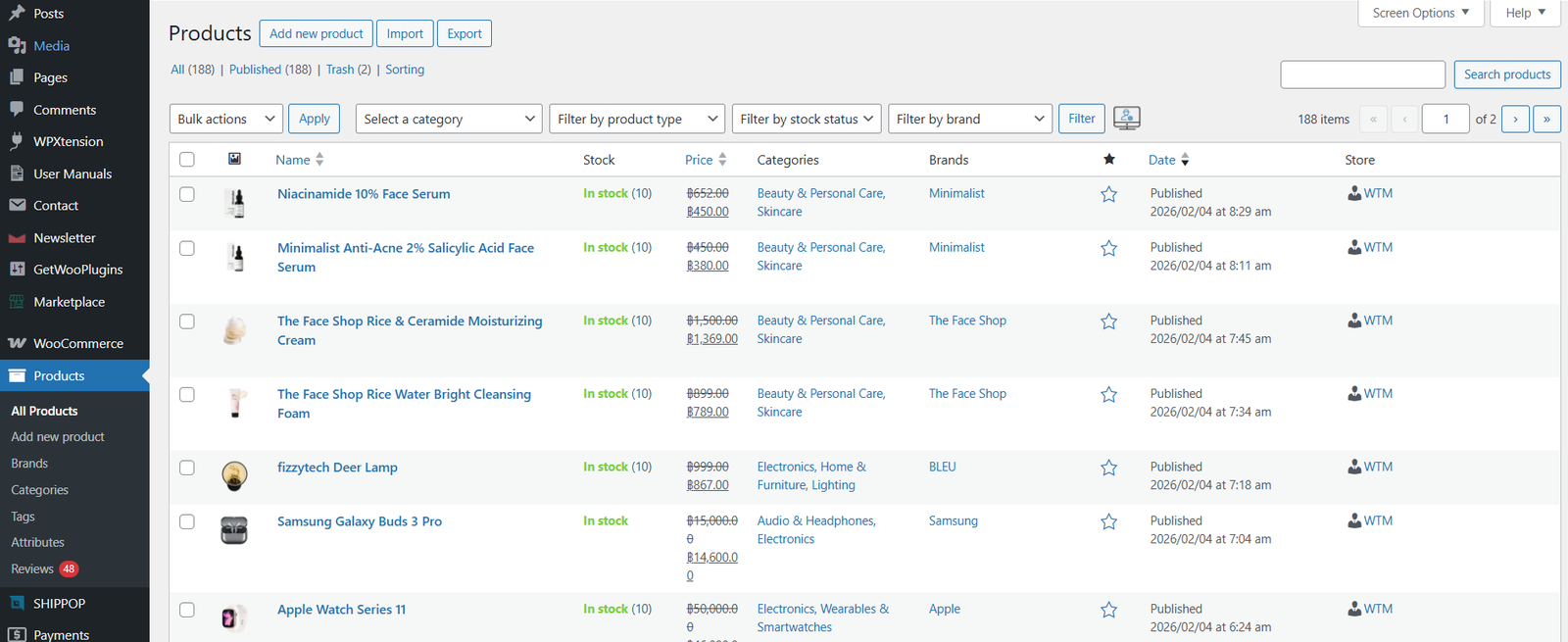
Click on the Products button from the left menu bar. Here you will see all the products from admin and all the vendors.
Click on Add Product button to add new products. You can create simple, grouped & variation products here. fill all the details in the modal.


 Seller Login
 About Us
 Blog
Blog Contact Us
 Faq
Faq My account
 ALLGOOD MALL
 Track My Order