















Order Management System
Order Management System
an Order Management System is a central software component within the admin portal that handles the lifecycle of every purchase — from the moment a customer places an order to the final delivery and any post-sale service. It acts as the backbone of operational efficiency, helping admins manage orders, inventory, and customer communication in one place.
Order Tracking and Status Updates
Once a customer places an order via the All Good storefront, the OMS records it in the admin panel. The system tracks each order through various stages:
-
Pending (newly placed orders), Confirmed, Processing, Shipped, Delivered, Cancelled or Returned
URL: https://allgood.previewonline.website/wp-admin/edit.php?post_type=shop_order
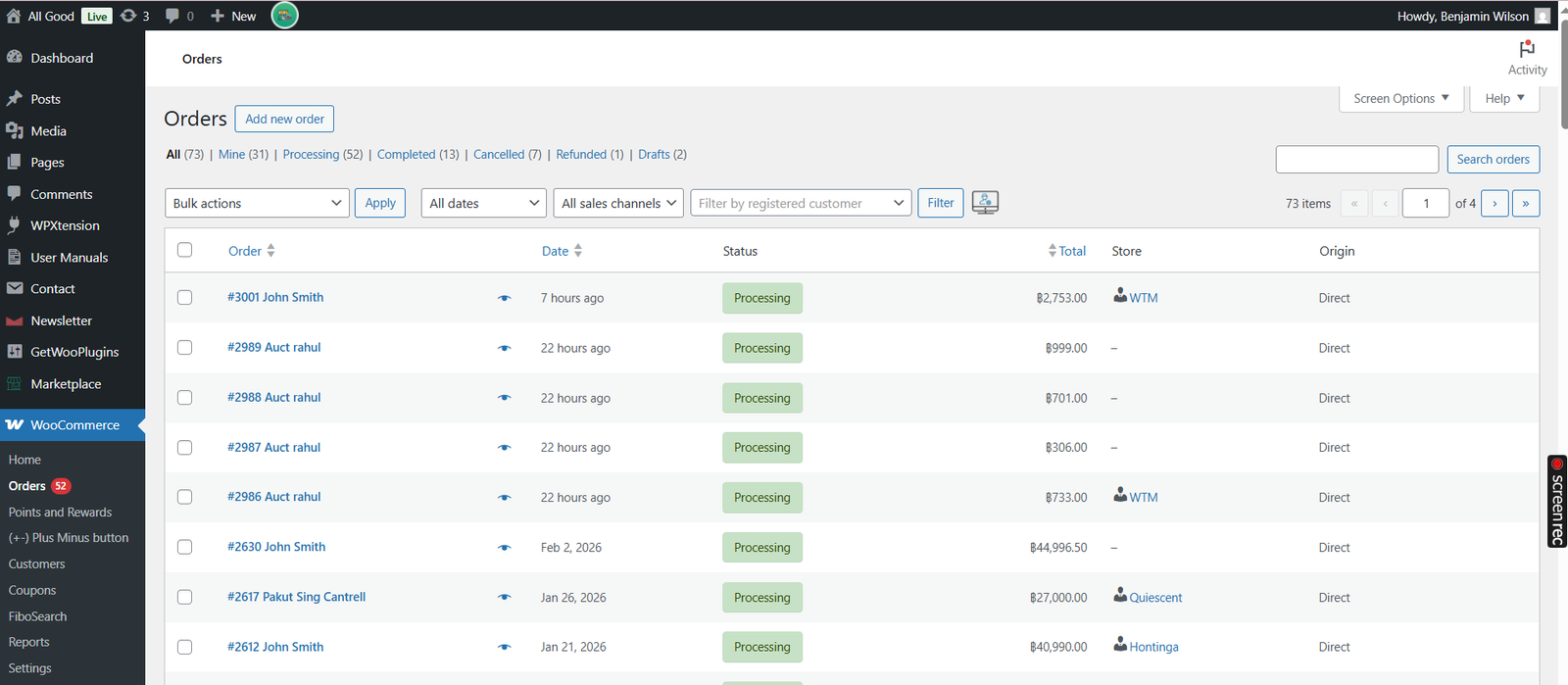
Click on the Orders button from the left menu bar. Here admin will see all the Orders of admin as well as vendors.
You can also create new order from admin panel by clicking on Add Order Button as shown below.


 Seller Login
 About Us
 Blog
Blog Contact Us
 Faq
Faq My account
 ALLGOOD MALL
 Track My Order